XrayTun: an Xray GUI client for macOS that takes over system traffic with native TUN mode
XrayTun is an Xray GUI client for macOS. It uses Xray-core's native tun inbound (with a
built-in gVisor network stack) to create a utun interface, splits the default route with
0.0.0.0/1 and 128.0.0.0/1, and takes over system DNS so that traffic on the
Mac follows routing rules. Only three operations run with root privileges inside a privileged helper
— creating the utun interface, installing routes and changing DNS. The Xray core itself runs as your
normal user.
Download for macOS v0.8.26 · dmg · 44.9 MiB Alternative .zip · 40.7 MiB
What it solves
macOS system proxy settings only cover apps that honour them. The system proxy is an HTTP/HTTPS/SOCKS setting, and many apps — especially ones with their own network stack, command line tools and games — never read it. XrayTun's TUN mode takes over the default route at the network layer, so individual apps do not need proxy support.
Changing system network configuration is a risky operation. TUN mode creates an interface, changes routes and changes DNS. If the process crashes or the machine loses power mid-way, the Mac can be left without working networking. XrayTun writes a session snapshot to disk before touching anything, updates it incrementally after each step, and rolls back a leftover session on the next start. Quitting the app restores the network configuration as well.
"Connected" does not mean "working". A node may complete a handshake but fail to forward traffic. XrayTun's watchdog sends a real request through the tunnel every 10 seconds and rebuilds the tunnel after two consecutive failures. If rebuilding fails, XrayTun falls back to direct connection instead of leaving you offline.
Routing decisions are usually guesswork. XrayTun includes a rule checker: enter a domain or IP and it evaluates the live rules together with geoip/geosite data to tell you which rule matched and which outbound the traffic uses.
Features
Every statement below can be checked against the documents in the GitHub repository (see links). This section also states what XrayTun deliberately does not do, because knowing the limits matters more than reading a feature list.
Protocols and subscriptions
- Node protocols: vmess, vless, trojan, shadowsocks, socks, http.
-
ShadowsocksR (
ssr://) is not supported: parsing anssr://link produces an explicit error rather than being silently ignored. - Subscriptions: four formats, auto-detected — Xray JSON config, Clash / Mihomo YAML, base64-encoded URI list, plain URI list.
-
One unsupported link (for example
hysteria2://) inside a subscription does not fail the whole subscription; it is skipped and logged.
Routing
- Four routing presets: global proxy, bypass mainland China (default), whitelist proxy, direct for everything.
- Custom rules are supported and run after the presets, never before them.
- Rule order matters: Xray takes the first matching rule from top to bottom, so ad blocking must be listed before mainland-China direct routing.
-
geoip / geosite matching is supported (for example
geoip:cn,geosite:cn);geoip.datandgeosite.datship with the app. - There is no visual rule editor yet: custom rules are shown read-only and must be edited in the settings file.
DNS
- Four DNS strategies: resolve everything through the proxy, split by rule (default), resolve everything locally, or use custom servers.
- Fake-IP is available and off by default.
- DNS resolver probing compares domestic and foreign resolvers separately, because the two groups use different network paths.
Traffic capture and privileges
- Three modes: direct, system proxy and TUN.
-
TUN mode uses Xray-core's native
tuninbound (built-in gVisor stack). There is no tun2socks sidecar process, and UDP/QUIC are handled by the same stack. -
Routes use a
0.0.0.0/1+128.0.0.0/1split instead of replacing the default route: the worst case is some traffic taking the wrong path, not losing the default route entirely. - System proxy mode does not modify macOS system proxy settings (as of v0.8.26). It only starts local SOCKS5 (127.0.0.1:10808) and HTTP (127.0.0.1:10809) inbounds; you point your apps at those ports yourself. Use TUN mode to capture traffic automatically.
- Least privilege: creating the utun interface, installing routes and changing DNS are done by a privileged helper, while the Xray core runs as your normal user. The helper only accepts connections from the app that pass code-signature validation.
- The privileged helper must be installed once from the app's settings, which asks for an administrator password.
Reliability and updates
- Launch at login through the macOS
SMAppServicelogin item. - Automatic recovery: if the app was connected when it last exited, it retries in the background up to 24 times with 5-second gaps (about 2 minutes); the tunnel watchdog probes every 10 seconds and rebuilds after two consecutive failures, falling back to direct connection if rebuilding fails. Switching Wi-Fi networks and waking from sleep use the same logic.
- Crash safety: a session snapshot is written to disk before network changes, updated incrementally, rolled back by the helper on next start, and reverted when the app quits.
-
Self-update: check GitHub releases, download the zip, compare against
SHA256SUMS.txt, replace the app and restart. To be explicit: XrayTun only verifies the SHA256 checksum. There is no signature verification, so this protects against corrupted downloads, not against a compromised upstream. - Traffic counters survive core restarts: restarting the Xray core resets its counters, and XrayTun carries the previous totals forward and honestly reports "the core restarted N times" instead of showing traffic dropping to zero.
Visibility features (a deliberate design trade-off)
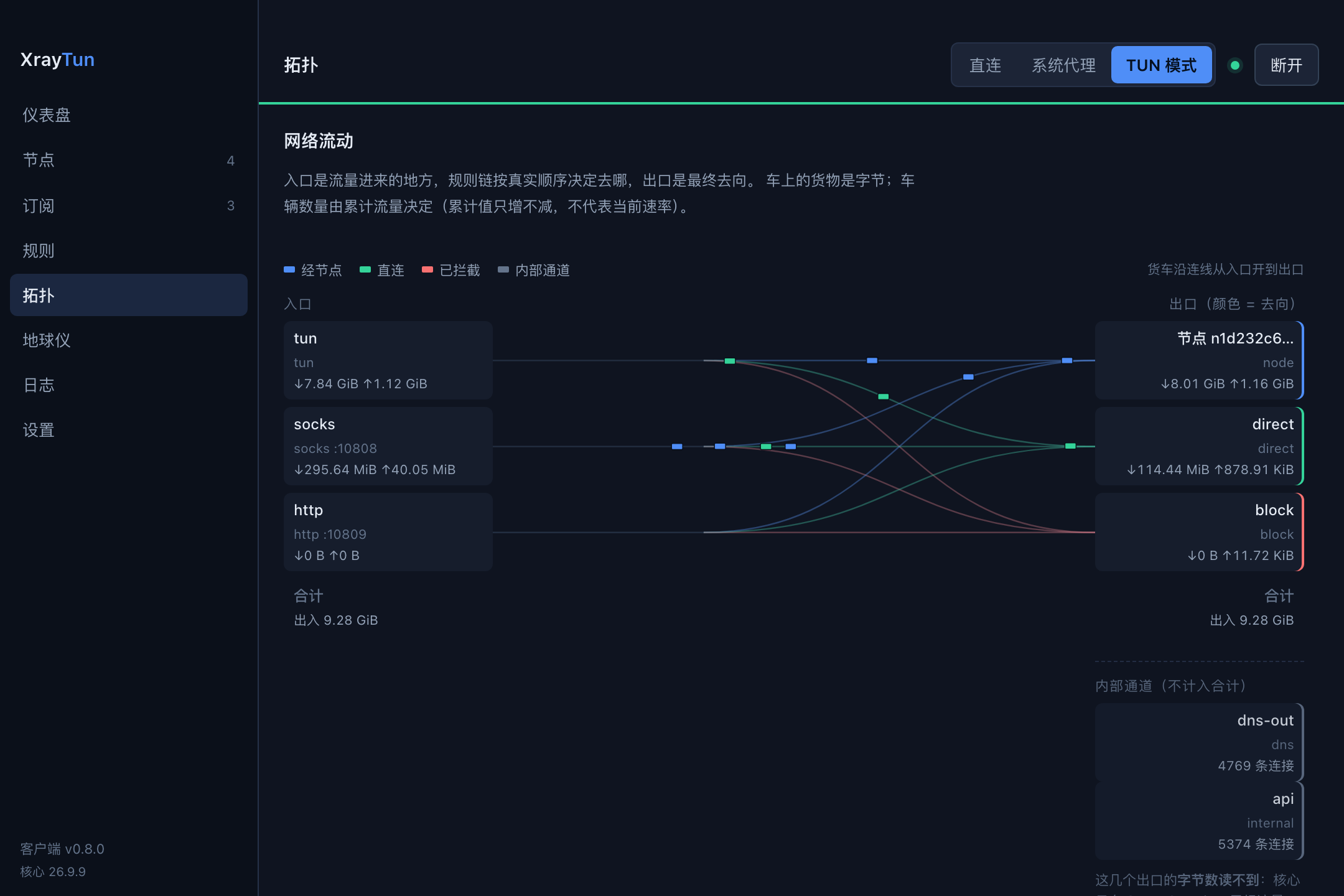
- Topology page: draws the structure of inbounds → rule chain → outbounds from the live configuration. The lines describe configured structure, not which line a particular flow actually took: Xray only exposes per-inbound and per-outbound aggregate counters, with no per-rule counters.
-
Globe page: draws the great-circle route from your public egress to the exit node
and labels both ends with a city. Location lookup uses third parties (
ipwho.isandip-api.com), and the queried IP addresses are sent to those services. The continent outlines are a rough 2° raster, not navigational coastlines. -
Recent connections: lists time, source, target,
[inbound → outbound]and domain from the Xray access log; selecting a row highlights that path on the topology. Domains come from time-ordered pairing ofsniffedlines withacceptedlines and can be wrong: the UI marks paired domains with*and shows the pairing delta in microseconds. About half of all connections have no domain at all. -
Logs and diagnostics: level filters, source column, and a one-click diagnostics
report that is redacted on the backend (subscription URLs keep only the host, UUIDs become
<uuid>).
What XrayTun deliberately does not do
- Per-connection byte counts and durations: Xray's stats service only has aggregate counters, and the access log records connection setup but not teardown. These two numbers are not shown anywhere.
-
Byte counters for
dns-outandapi: Xray does not count UDP outbound traffic or loopback traffic, so those counters stay at 0. XrayTun groups them separately as "internal channels" and uses connection counts instead; theblockoutbound really does carry 0 bytes. - "Active connection count": a connection disappearing from the list does not mean it closed; it may just have been evicted from the ring buffer.
- No Windows, Linux or mobile builds; the UI is currently Chinese only; no visual rule editor, node grouping or light theme.
Download
Download for macOS v0.8.26 · dmg · 44.9 MiB
| File | Size | Link |
|---|---|---|
| dmg (primary) | 47,128,987 bytes (44.9 MiB) | XrayTun_0.8.26_x86_64_arm64.dmg |
| zip (alternative) | 42,636,964 bytes (40.7 MiB) | XrayTun_0.8.26_x86_64_arm64.zip |
| Checksums | 200 bytes | SHA256SUMS.txt |
| All releases | — | GitHub Releases |
Requirements
- macOS 13.0 or later.
- Apple Silicon and Intel are both supported natively (same universal build).
-
No separate Xray installation is needed: the Xray-core binary,
geoip.datandgeosite.datare inside the app bundle. - You need your own Xray node or subscription URL. XrayTun does not ship nodes and does not provide a node service.
- One administrator password is required once, to install the privileged helper.
Verify the download (optional)
grep XrayTun_0.8.26_x86_64_arm64.dmg SHA256SUMS.txt
shasum -a 256 XrayTun_0.8.26_x86_64_arm64.dmg
The two hashes should match. SHA256SUMS.txt is generated with
shasum -a 256 ./*, so each line starts with ./; extracting the line with
grep and comparing it manually is more reliable than running shasum -c on
the file.
Install
The downloaded app will be blocked by macOS, and that does not mean the file is corrupted. Step 3 below gives three ways to allow it — pick the one that matches your macOS version.
Step 1 — Drag the app into Applications
Open the downloaded dmg and drag XrayTun.app into your Applications folder.
Step 2 — The first launch is blocked (expected, not a broken download)
You may see a message such as "cannot verify the developer" or "Apple cannot check it for malicious software". XrayTun is ad-hoc signed and not notarized: the project has no Apple Developer ID certificate, which requires a paid account, so macOS cannot verify the app the usual way. The verification result is "rejected" — this is expected, not a download error.
Step 4 — Install the privileged helper inside the app (TUN mode needs it)
Open XrayTun, go to Settings → Privileged helper → Install. This asks for an administrator password once. Only interface creation, route installation and DNS changes run inside the helper; the Xray core still runs as your normal user.
Step 5 — Confirm the installation worked
In Settings → Environment check, the helper should show "ready". Switch the mode in the top bar to TUN, add a subscription or node, click Connect, and normal browsing means you are done.
Removing it later
Quitting XrayTun restores the network configuration. Before deleting the app, quit it and uninstall the helper (the helper's uninstall request rolls back the network configuration before removing itself) so no routes or DNS settings pointing at the utun interface are left behind.
FAQ
Do I need to install Xray separately?
No. The app bundle already contains the Xray-core binary plus geoip.dat and
geosite.dat under Contents/Resources/. You only need a node or a
subscription URL.
Which macOS versions and CPUs are supported?
macOS 13.0 or later, on both Apple Silicon (arm64) and Intel (x86_64), from one universal build. There is no Windows, Linux or mobile version.
The app says "cannot verify the developer". What should I do?
That is the expected prompt for a non-notarized app, not an installation failure. On macOS 15 and
later, use System Settings → Privacy & Security → Open Anyway. On macOS 14 and earlier,
right-click (Control-click) the app and choose Open. Alternatively run
xattr -d com.apple.quarantine /Applications/XrayTun.app in Terminal and open the app
again.
It says "XrayTun.app is damaged and can't be opened" — is the file really damaged?
No. Gatekeeper rejects ad-hoc signed, non-notarized apps, and the wording resembles a corruption
message. Run xattr -d com.apple.quarantine /Applications/XrayTun.app first; if it still
fails, verify your download against SHA256SUMS.txt (see the download section).
Why is the app not signed with a Developer ID and notarized?
Because signing and notarization require a paid Apple developer account, and the project has no Developer ID certificate. The trade-off is a manual approval on first launch, and it is documented publicly in the release notes.
Why does XrayTun need to install a privileged helper?
Because creating the utun interface, changing the routing table and changing system DNS all require root. The helper is a root daemon that does only those three things and only accepts connections from the XrayTun app that pass code-signature validation. The Xray core itself keeps running as your normal user.
Does "system proxy" mode configure the macOS system proxy automatically?
No (as of v0.8.26). System proxy mode only starts local SOCKS5 (127.0.0.1:10808) and HTTP (127.0.0.1:10809) inbounds; you point your apps or system proxy settings at those ports yourself. To capture all traffic automatically, use TUN mode.
Which node protocols and subscription formats are supported?
Node protocols: vmess, vless, trojan, shadowsocks, socks and http. Subscriptions: Xray JSON, Clash / Mihomo YAML, base64-encoded URI lists and plain URI lists, auto-detected.
Is ShadowsocksR (ssr://) supported?
No. Xray-core does not support ssr://, so pasting an ssr:// link produces
an explicit error instead of being silently ignored.
Why do some outbounds show 0 B of traffic?
Because that is a blind spot in Xray's statistics, not an absence of traffic. Xray does not count
UDP outbound traffic (dns-out) or loopback traffic (api), so those byte
counters stay at 0. XrayTun lists them separately as "internal channels" and uses connection counts
instead. The block outbound really is 0 bytes, because connections are rejected before
any data flows.
How accurate are the domains in "recent connections"?
They are approximate. In Xray's access log, the connection setup line (accepted)
carries no connection ID, while the domain appears on a separate sniffed line, so
domains can only be paired by time, and concurrent connections can be paired incorrectly. The UI
marks paired domains with * and shows the pairing delta in microseconds so you can
judge. About half of all connections have no domain at all, which is normal for IP-based and
internal traffic.
How much data did one connection transfer, and how long did it last?
Not available, because Xray does not provide either number. The stats service only exposes per-inbound and per-outbound aggregate counters, and the access log records setup but not teardown. XrayTun does not fill the gap with estimates.
Can a crash or power loss break my network configuration?
It can leave residue, and XrayTun is built to clean it up: a session snapshot is written before any network change and updated incrementally, the helper rolls back any leftover session on start, and quitting the app restores the configuration. If system DNS still points at the in-tunnel sentinel address while the tunnel is gone, the app states the cause and gives you the exact fix command.
Do I have to reconnect manually after switching Wi-Fi or waking from sleep?
No. The watchdog sends a real request through the tunnel every 10 seconds and rebuilds after two consecutive failures; after login, if the app was connected when it last exited, it retries in the background for about two minutes so it can come up before Wi-Fi is ready. If rebuilding fails it falls back to direct connection. To be straightforward about a limitation: in v0.8.26 and earlier the UI only shows "connected" or "disconnected" and does not display recovery progress, so you may briefly see "disconnected" while it recovers in the background.
Is the auto-updater secure?
The updater downloads the zip from the project's GitHub release and verifies it against
SHA256SUMS.txt, refusing to install if the checksum does not match. To be explicit:
there is no signature verification, so it protects against corrupted downloads, not
against a compromised upstream. Real signing and notarization require a Developer ID certificate.
What licence does XrayTun use?
The source is public on GitHub and released under the MIT licence: the repository
contains a LICENSE file and
Cargo.toml declares license = "MIT". The bundled Xray-core is licensed
under MPL-2.0 (invoked as a separate process, not a derivative work); see the Xray-core repository
for its licence, and geoip.dat / geosite.dat ship with their upstream project.
Links
- Source repository: github.com/harodggg/xrayTun
- All releases: GitHub Releases
- Changelog: CHANGELOG.md
- Documentation: docs/
- TUN and privileges: docs/02-tun-and-privileges.md
- Routing and DNS: docs/04-routing-and-dns.md
- AI summary for this site: llms.txt